
FIRST OF ALL — INTRODUCTION
Last week, we introduced you to Gamma, the AI that builds you a complete, polished slide deck from a prompt or your existing content in minutes, with no design skill required.
This week, meet a tool that does something slightly different.
While Gamma builds full decks, this one visualises ideas. They do two different jobs — you might use both in the same week and never have them overlap. Gamma is for when you need a full presentation. Napkin AI is for when you need a concept, a process, or an explanation to make immediate visual sense; in a report, a training document, a proposal, a newsletter, a pitch, or anywhere a single powerful diagram would do more work than three paragraphs of explanation. After all, a picture is worth a thousand words.
Enter Napkin AI.
You know that moment when you are trying to explain something and the words are just not landing? You have said it three ways and maybe gestured with your hands, but the person across from you is still nodding slowly, clearly not seeing what you are seeing?
E don happen to all of us.
Napkin AI was built for that moment. You bring the text and it finds the visual that was hiding inside, especially finding the metaphor that actually fits your meaning.
I put it to the test and what it did might surprise you.
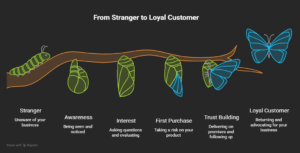
I wrote five short paragraphs about how a small business earns customer loyalty, describing five stages from complete stranger to loyal advocate. I expected Napkin AI to produce a clean five-stage flowchart with boxes and arrows. Instead, it drew a butterfly’s metamorphosis.
Caterpillar. Cocoon. Emerging wings. Full flight. One stage of transformation per image, all on a single branch, labelled: Stranger → Awareness → Interest → First Purchase → Trust Building → Loyal Customer.
The tool read “from stranger to loyal customer,” understood that this was a story about transformation and chose the biological metaphor that matches that truth. The visual said more than the original text did.
This is a tool that understands!
HOW IT ACTUALLY WORKS — STEP BY STEP
- Sign up: Go to napkin.ai. Sign up free and enter the verification code they send to your email.
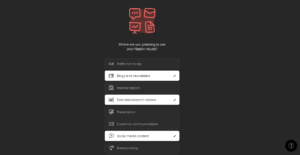
- Answer the onboarding questions Napkin AI asks how you plan to use the tool — for school, work, or personal use — and a few follow-up questions about your setup. It takes about a minute. Shoki l’obe oge! Answering honestly helps the tool configure the right defaults.
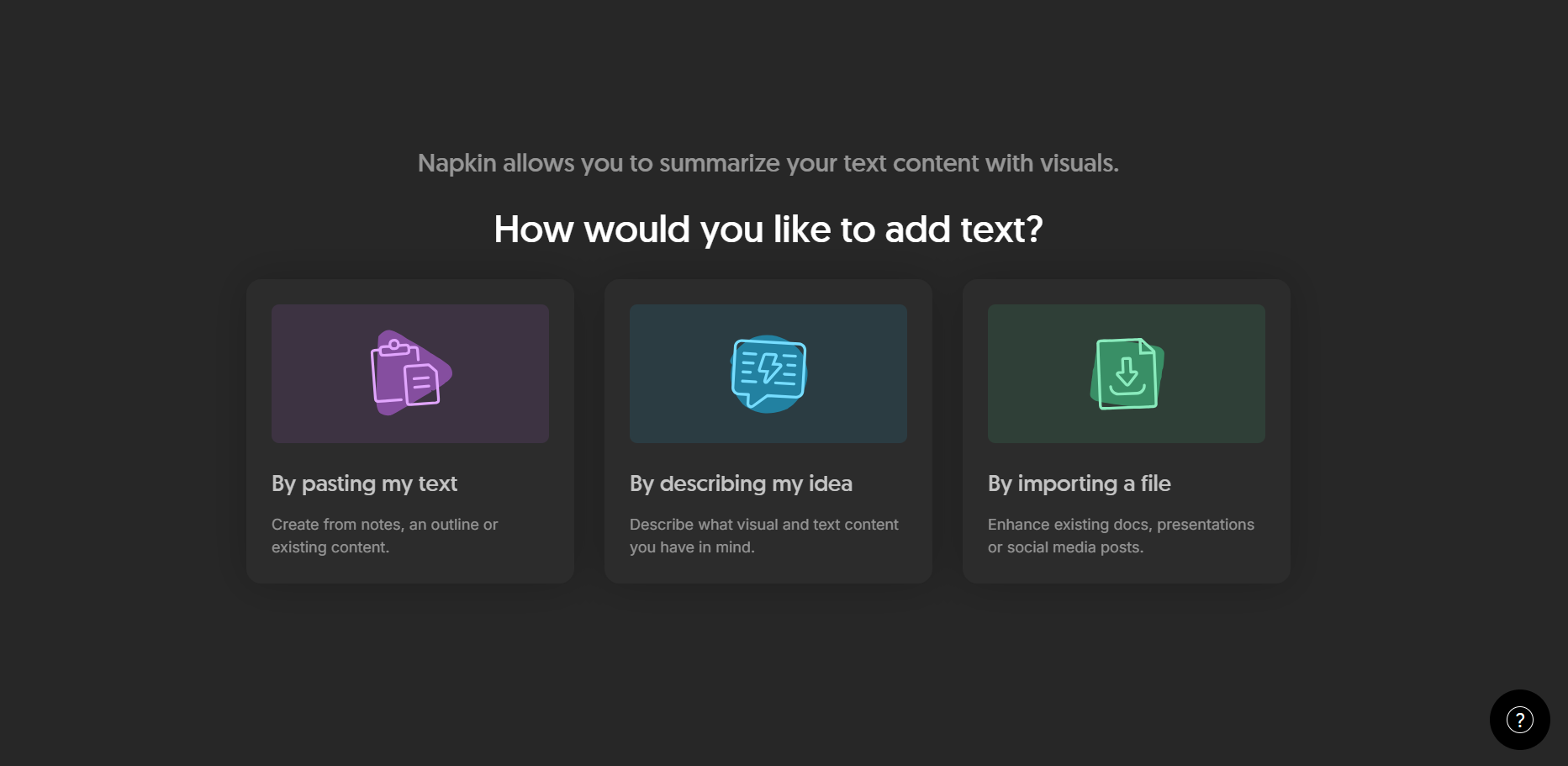
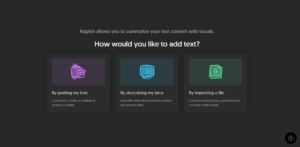
- Choose how to add your text: Napkin AI has three entry points:
- By pasting your text: for notes or existing content
- By describing your idea: for when the concept is still forming
- By importing a file: to upgrade an existing document
I chose to paste my text and pasted five paragraphs on How a Small Business Turns Strangers into Loyal Customers. The text contained about 200 words.
- Generate: Because our text was short and well-structured, Napkin AI generated across the whole document in one go. Longer texts will have you work section by section. You’ll have to hover over a section and a flash icon appears. Click it to generate for that section, then move to the next.As you can see in the image below, my text came back with a butterfly metamorphosis. Six stages on a single branch, from caterpillar to full flight. Labelled with our exact stage names. Immediately legible. We did not ask for a butterfly. The tool chose it.
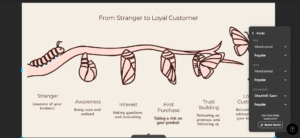
- Customise to your taste: Click into the visual to adjust. You can switch the diagram type, cycle through alternative visual suggestions, or accept what it produced. I switched the colour theme three times just to see. The same diagram feels completely different across each one.
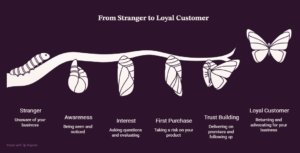
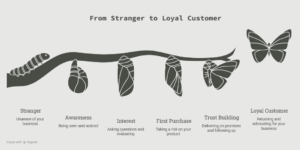
- Export: When you are ready to download, go to export and pick your format. Before you click download: turn the background on. It is off by default. If you export without switching it on, your file will download black or completely transparent, even though the visual go still fine small. There is nothing wrong with your diagram; you just need to toggle the background on. Nobody tells you this upfront, so now you know.
Resolution is also adjustable here if you need a higher-quality file.
WHO THIS THING HELP?
- Business owners and entrepreneurs: That pitch abi strategy wey dey your head since last month? Napkin AI will give it a shape. You can use it anywhere a clear visual would do more work than another bullet point; a presentation, a proposal, etc.
- Educators and trainers: Napkin can draw any concept you’re struggling to explain verbally. Paste your lesson notes and see what it draws. The visual suggestion often captures the concept more efficiently than three minutes of talking.
- Consultants and professionals: Your strategy documents are full of ideas that deserve better than text blocks. Napkin AI can turn your insight into something visually credible; the kind of thing people screenshot and share beyond your original audience.
- Content creators and newsletter writers: Embed Napkin AI visuals into your content to anchor key points and break up long text. A well-chosen diagram holds attention better than another paragraph. And Napkin AI pairs naturally with tools like Gamma. You can diagram your concept in Napkin, for example, then drop that image into your Gamma presentation for a complete, visually coherent deck.
PROs, CONs, AND PRICING
Why You Should Consider Using Napkin AI
- It thinks in metaphors: The butterfly was the tool reading for meaning and choosing the right visual form. That is what separates Napkin AI from basic diagram builders.
- The free tier is genuinely useful: 500 AI credits per week, unlimited editing, PNG and PDF export. You can do real, shareable work before spending a kobo.
- Zero design experience needed: The interface is clean and the results look professional. Customisation is easily accessible, not buried in menus.
- Three ways to start: Paste, describe, or import. The import option in particular — uploading an existing document and letting Napkin enhance it — saves time for professionals who already have materials to work from.
- Works alongside other tools: Napkin AI is not trying to be a full presentation builder. It does one job very well. You can later drop its output into Gamma, PowerPoint, Canva, or wherever you work. It fits into your existing workflow without replacing it.
WAIT, Just Before You Jump In… (Shine Ya Eyes)
- Turn on the background before you export: Background is off by default. Export without it and your file downloads blank. One toggle, but you have to know it is there.
- Longer texts = section-by-section work: The more text you feed it, the more you will be generating one section at a time. Good for quality control, slower if you are in a rush.
- Watermark on the free plan: Your free-tier visuals carry the Napkin branding. Fine for internal documents. You will need Plus for client-facing work.
- SVG and PowerPoint export are paid-only: High-resolution or editable formats for embedding into presentations require the Plus plan at $9/month.
- Internet is non-negotiable: Fully cloud-based. Unstable connection means stalled generation. Network wahala go slow you down.
Pricing
| Plan | Price | Key Features |
| Free | $0 | 500 AI credits/week, unlimited editing, PNG & PDF export, Napkin watermark on visuals |
| Plus | $9/month | 10,000 credits/month, PPT & SVG export, 3 brand styles, bold icons, no watermark |
| Pro | $22/month | 30,000 credits/month, unlimited custom branding, upload your own fonts, team management |
KINI BIG DEAL — Why Does This Matter?
The butterfly was the proof, not the point.
I did not ask Napkin AI to draw a transformation. I described one in plain language, with no design brief, no visual prompt, no instruction beyond the text itself. The tool read it, understood what kind of thing it was, and drew the image that fits that truth. That is AI working the way it should: augmenting your thinking, not replacing it.
And that brings us to the thing we want to say directly.
There is a lazy version of this workflow, and it is very easy to fall into. ChatGPT writes your content and Napkin AI draws the visuals. Nobody in that pipeline actually thought about anything.
The output looks fine at first glance, but the butterfly came from my text. If the input had been generic, the output would have been generic too. The metaphor intelligence only fires when the thinking behind your words is real. You cannot outsource the idea and then expect the tool to rescue it.
Napkin AI is not a substitute for knowing what you want to communicate. It is a tool for communicating it better, once you know.
For African professionals, educators, and entrepreneurs who have always had strong ideas but struggled to find the right visual language to carry them, this tool removes one of the most persistent barriers between your thinking and your audience.
Ẹni tó bá rán ẹlòmíràn ìsé, kò gbọdọ jókòó. The one who sends someone on an errand cannot sit idle.
Bring the idea and let Napkin AI draw what you mean.
Try Napkin AI free: napkin.ai
Until next time, stay curious.